

The issue with not being able to craft the weapon has already been forwarded and will most likely be fixed during the next maintenance. However, that this issue affects the martial artist is actually a coincidence because someone did a typo when setting up the necessary item ID. This could have affected any other class or item as well and has nothing to do with martial artist players being treated like 2nd class citizen.
Posts by Deramon
-
-

What was the name of the mobile game ?
The korean name is 우리가 영웅이다 or We are the Heroes in english.
You can find a couple of screenshots and videos here: https://blog.naver.com/PostVie…ihu007&logNo=220725143510
I believe it was only available on the korean market and not for very long but Entwell reused some sprites of this game in Nostale at a later point. In the images you can see, for example, the Demon Hunter and the Battle Monk, before they were released in Nostale.
-
Unfortunately, Hiromiya left the NosTale EN Team today.
Many thanks for taking your time to assist us and the community in the past months!
-
Once again we are happy to announce that we were able to recruit another new Trial Game Master on September 4th.
Welcome Savrage to the NosTale EN Team.
Enjoy your new tasks!
-


What is the reason behind removing such ways to get gold?
Mainly the three digit amount of bots abusing these low level gold sources we ban every day, especially since the starting level has been increased.
I see... But wouldn't it have been simpler to simply limit the number of Nostales that can be opened by IP simultaneously? I think I remember that in the past, the use of sanboxie to open more than one nostale was quite moderate.
That wouldn't help at all, unfortunately.
-
What is the reason behind removing such ways to get gold?
Mainly the three digit amount of bots abusing these low level gold sources we ban every day, especially since the starting level has been increased.
-
Activate and deactivate your characters
- Use the Gameforge Launcher to log in to your Gameforge Account.
- Click on Settings right next to your game account name to open the game account menu. At the top of the menu, choose English [GB] as your game language. This step is important, otherwise you can't adjust your characters.
- Choose the game account you want to adjust and press the Settings button.
The old NosTale page will open up in your browser which looks like the screenshot below:
- Choose the server you're playing on.
- Under Active characters, select the character you want to deactivate. The selection is displayed by a green frame around the selected character. In case you can't see any of your characters, please check whether you selected English [GB] as your game language as described above.
- Under Inactive characters, select the character you want to activate.
- Close the website and start the game!
Steam accounts
In case you only played via Steam before, you need to add your Steam game account to your Gameforge account first, otherwise you won't be able to access the settings page of your game account.
You can find a detailed description on how to do that in our guide [ From Steam to Gameforge: How to link accounts ].
If you have issues linking your account, please feel free to use our [ ticket support system ] to contact us. We are happy to help there!
-
-
We originally had only one server that was specifically intended for players in America and even physically located there. That server was merged into the current server Valehir.
So in theory, Valehir should still have more of American players. However, the server is currently less active overall compared to Dragonveil, and due to time zone differences, it's still possible for European night owls to make Dragonveil appear busier during American daytime hours.Based on experience - purely empirical and without long-term login analysis - we've observed that there are relatively few players from the Americas overall. The majority of the player base comes from Europe, with a significant number also coming from Asia.
Next week, Valehir will be merged once again, this time with Alzanor and Cosmos. Both of those servers are relatively active, and we hope this measure will also bring back some former Valehir players. Activity should noticeably improve starting next week. Whether this improvement will also be noticeable during American daytime hours remains to be seen, as both servers being merged in are, like all other servers merged into Dragonveil, European.
Unfortunately, it is not possible to transfer a character to another server outside of a server merge.
-
Using software capable to hide your real IP address, including VPNs, is prohibited regardless of your intentions.
This is mentioned more than only once within our platforms. For example in our game rules:
§5 Cheating
The use of VPNs, proxy servers or any other service that masks your real IP is prohibited.
and in our Terms and Conditions:
6. User's obligations to desist
6.2 Actions to disguise the true IP address of the user shall not be taken.
-
Hi there!
I'm sorry to hear you're experiencing this issue.
Not receiving the special reward after completing a Timespace means that you have already completed it in the past as you can always receive this reward only once.
Please submit a ticket using our ticket support system so we're able to help you by refunding the missing item.
You can find the ticket support system using this link: https://nostale.support.gameforge.com/index.php?fld=en
Please note that Gameforge accounts aren't linked to our ticket support system, so you might need to create a new account there.
-

Vedo che hai imparato a scrivere il mio nome, complimenti
Mi dispiace, non posso scrivere il tuo nome
Troppo difficile?
Le mie dita si spezzano quando scrivo!
-
Vedo che hai imparato a scrivere il mio nome, complimenti
Mi dispiace, non posso scrivere il tuo nome
-
Contents [Hide]
Submit a ticket
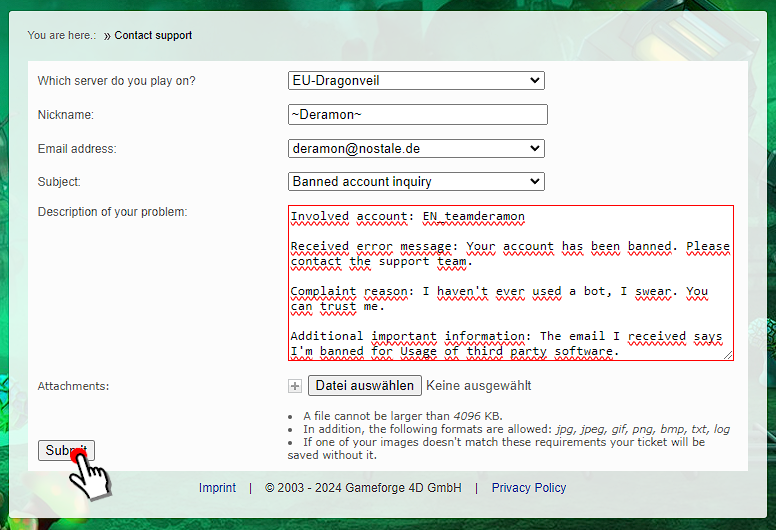
Once you are logged in in our ticket support system, you can submit your request by clicking on Contact support and then select either Game, Board or Payment.
No worries, you can't really do anything wrong there. If you chose an incorrect category, we will forward your ticket to the responsible people.

After you chose something (I will use Game in this example), please enter all the necessary information.
You can attach up to three attachment per answer. If you want to attach more than three screenshots, please attach three at first, then open the ticket you have just sent (don't create a new one) and attach three more screenshots in a new reply to the same ticket.

The box where you can describe your problem will automatically adjust based on the subject you have selected.
Please fill in all the required information so we can handle your ticket as soon as possible.
Once you entered all the important information, click Send.
Check your ticket's status
To check out the processing of your ticket, please click on Ticket history:

And on the subject of the ticket you want to read:

All the replies sent by our team will be visible here.
If you want to close your ticket because you found a solution yourself, you can use the Close button on the right.
If you want to answer to one of our replies, please use the Send reply function on the top right.
-
Attach your Steam account to our ticket support system
When and why do you need to attach your Steam account?
We have to make sure that the user who sent the ticket really is the owner of the game account.
If the data does not match we can not process your request due to data protection restrictions.
We need you to attach your Steam Account in case you are using a Steam-only-Account without an email address.
If your Steam Account is already linked to your Gameforge Account, you only need to have your Gameforge Account Email attached to our ticket support system, unless somebody in your ticket gives you different instructions.
How to attach your Steam account to our ticket support system
- You click on Home and then on Manage Steam-Accounts

- You click on Add Steam-Account

- A new page will open up where you need to log in using your Steam Account login.
Once you did this or if you are already logged in, you will be asked whether you want to link your Steam Account to the Gameforge ticket support system.
Click on Sign In
- If you go back to Home and Manage Steam-Accounts, you will find your attached Steam Account's ID under confirmed Steam Accounts

- You click on Home and then on Manage Steam-Accounts
-
Attach your email address to our ticket support system
Why do you need to use the same email address?
We have to make sure that the user who sent the ticket really is the owner of the game account.
If the data does not match we can not process your request due to data protection restrictions.
How to attach your email address to our ticket support system
- You click on Home and then on Manage email addresses
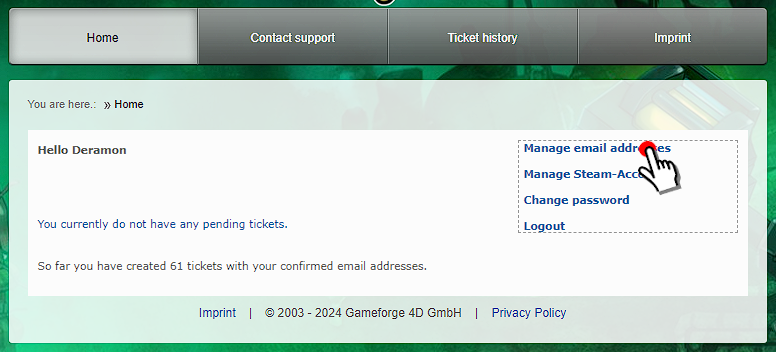
- You click on Add email address
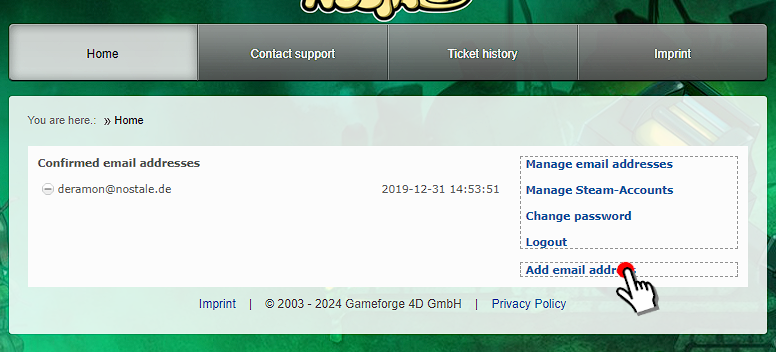
- Insert the email address you wish to attach to our ticket support system and click on Submit
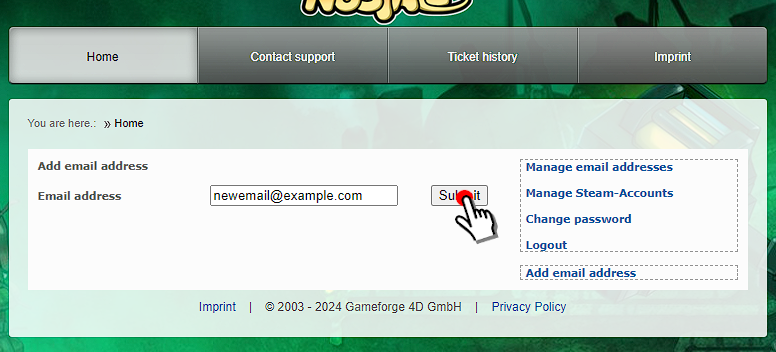
- If the email address you want to add there is already part of a different ticket support account, which is most likely the case if you ever created one, you need to confirm again by clicking on Request confirmation email that you want to attach this email address to your new account.
You won't lose any of your old ticket by doing so and everything will still be available afterwards.
- The ticket support system confirm the email address has been added to your ticket support account.
You are not required to check your email inbox and confirm again by clicking on the link that has been sent to you.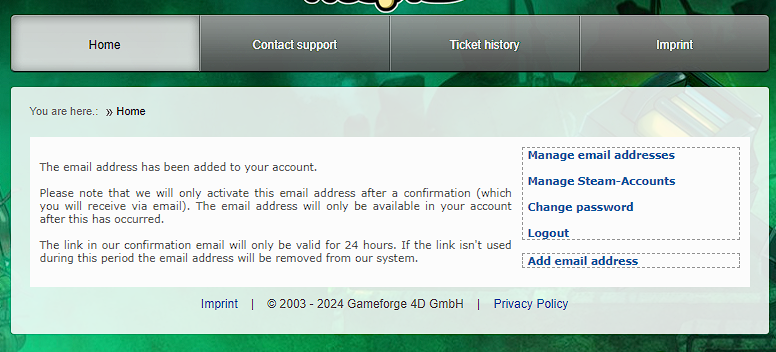
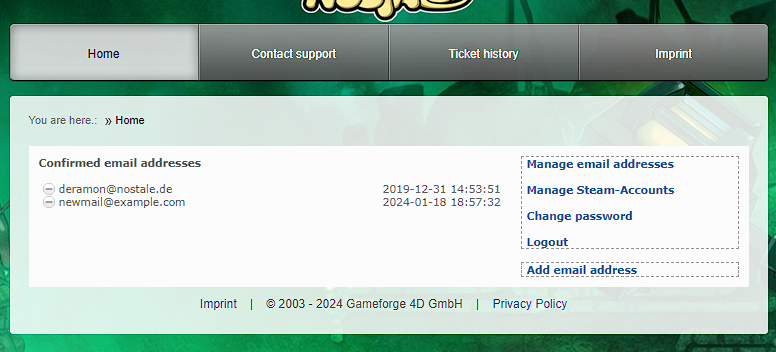
- After you confirmed the link that has been sent to you, your email address will be shown as a confirmed one in your account:
- You click on Home and then on Manage email addresses
-
Contents [Hide]
Get ready to submit a support ticket
Before you can send a ticket, you need to create an account for our ticket support system.
Please bear in mind that your ticket support account and your Gameforge account are not the same.
Even if you have a Gameforge Account to play already, you need to register your ticket support account seperately.
Register your ticket support account
To register a new account, please follow the steps below:
- Click on register

- Click on Register one more time

- Fill in the form and click on Register again. Please always use the same email address as you use for your Gameforge Account.

- A link to confirm you registration will be sent to your email address.
Once you clicked this link, you successfully created your ticket support account and continue with the next steps.
Log In using your ticket support account
Once you have successfully created your ticket support account and confirmed your email address, you can log in using your ticket support account.
You have two possibilities to log in: either you use your email address or you use the Steam-Login
- If you want to use your email address, insert your login details and click on Login

- If you want to use the Steam-Login, click on the Steam-Icon and follow the steps on the web page that will open up

- Click on register
-
Hello Nostale players,
Sometimes you will not be able to find a Gamemaster in the chat available so you have to use the ticket system for your question or for issues regarding your account. But not everyone knows how the ticket system works.
First of all the ticket system is used for account issues, questions about the game or if you want to report someone or something.
It is absolutely necessary to add the email address of your game account in your ticket system account.
In this thread you can find a detailed tutorial about the options of the ticket system and how to write a ticket, answer it and view the ticket history.
You will find the official support system of Nostale on https://nostale.support.gameforge.com/index.php?fld=en
Table of contents
- Get ready to submit a support ticket
- Attach your email address to our ticket support system
- Attach your Steam account to our ticket support system
- Submit a ticket
- Check your ticket's status
Credits
Guide Made by: Yumeji
Updated by: Morgoth and Deramon
-
Hello!
Considering there have been several issues through the years here is a guide to help you and avoid being scammed in any way.
The sooner you report an incident to us the more chances we have to restore the item(s) you lost. Unfortunately there is no guarantee that we can retrieve the item you lost but the person who scammed you will be dealt with.
When you wish to lend any item of yours to someone and you want to have it back make sure to have screen shots showing the following:
- Date and time of the screenshot.
- The agreement you have with the person.
- Date and time you wish to have your item back. (The more specific you are the better)
Please be aware that, according to our game rules, the return period may not be longer than one month. - The items' details. (Shell, rare level, upgrade level, SP card points, perfection points, wings, resistance numbers, etc.)
- The actual trade panel with the confirmation message afterwards.
If you simply want your friend to help you trade gold or items between your characters then write it so in the chat and take a screen shot of it.
If you do not have screen shots showing the above stuff then we will not be able to assist you.
When you wish to buy something make sure the person you are trading with is trustworthy. We can help you restore the items you lost if you have screenshots showing the following:
- Date and time of the screen shot.
- The agreement you have with the person.
- The gold or items you have to give them in order for them to sell you the item you wish.
- Date and time you wish to have your item back. (The more specific you are the better)
Please be aware that, according to our game rules, the return period may not be longer than one month. - If there are item secures involved make sure the items cover the cost of the items you will probably lose. (The whole purpose is if you get scammed you can recover the value)
If you do not have screenshots showing the above stuff then we will not be able to assist you.
When you wish to sell something again make sure the buyer is trustworthy and make sure to have screenshots with the following points:
- Date and time of the screenshot.
- The agreement you have with the person.
- The gold or items you want from them so you can sell them your item.
- Expiration date. (Detailed conversation if you agreed to help a person that does not have all the gold at the time, make sure you are very clear about how much time they have to pay you)
Please be aware that, according to our game rules, the return period may not be longer than one month. - If there are item secures involved make sure the items cover the cost of the items you will probably lose. (The whole purpose is if you get scammed you can recover the value)
If you do not have screen shots showing the above stuff then we will not be able to assist you.
Misleading Shops
If a user has set up a private shop in order to mislead other users with the intend to scam them, then you can report it to us by providing the following:
- Screenshot of the misleading shop name.
- Screenshot of your possible chat with them.
- Screenshot of the possible speaker the scammer may have used.
- Screen shot of the possible general or whisper chat the scammer may have tried to mislead you on.
If someone tries to trade you with a similar name of someone you trust make sure its the correct person, do not simply trust someone and start giving them stuff.
Additionally now with the name changes be very certain who you trade with.
So here are some tips to avoid being scammed.
- If a trade window pops up and you get asked if you can lend any kind of gear/items, check the name and the level of the one that is trading you first, make sure it is not a possible imposter.
- If you can't see the person who is trading you then make sure that they are truly the person they claim to be.
- Use common sense. If something seems too good to be true then it probably is.
- If the imposter says they are on their multi-account then ask them to change back to their main character. If they refuse to do so - do not agree to any trade.
- If you are sure the one that is trading you is the original, you should never trade without a counter value from the person who wants to get something from you.
Example: If you got resistance boots that are worth around the same as a golden specialist card holder - let them provide you a golden specialist card holder as a counter value. Make sure to return it as soon as you get your stuff back! - Even if you received a counter value and the person who got your items disappears resulting that you will never get the items you wished at the beginning, it will still be counted as a scam.
Before the trade, make sure to form a trading agreement as explained above, make a screenshot of that trading agreement and you will be on the safe side. - Buyer or seller can still change their mind about a possible transaction as long as they have not received or gave away any goods of the trade. If either wish to change their mind then you need to revert the whole trade back as it never happened unless both parties agree that it is fine.
Example 1:
Person A: S> +13 monk whisper me
Person B: "Hello I wish to buy the monk"
Person A: "Sure mate, just you need to provide the card carrier"
Person B: "Alright! but I want you to secure it"
Person A: "Sure thing!"
Person A: -trades Person B-
Person B: -accepts-
Person A: -Puts in an item that is worth same gold as a card carrier-
Person B: -Puts in the card carrier-
Person B: *Takes screen shot of all the chat and trade panel*
If person A disappears now simply sell their item and you will get the gold back, and make a ticket to report the incident to us with the screen shot.
If the person A does not disappear then it continues...
Person A: -Trades person B with the card carrier that has the agreed +13 monk inside-
Person B: -Puts in the item person A gave them as secure-
* Both accept trade*
Person A: "Thanks man"
Person B: "thanks as well!"
Example2:
Person A: B> Warrior+15 and a blade+15 pm me.
Person B: Hello selling both of them, wanna buy for 450mill both?
Person A: sure man thanks!
Person B: perfect! I will put the warrior for 225mill in basar and then I will put the blade as well.
Person A: Sounds good!!!
Person A: -Buys the warrior-
Person A: Hey man I bought the warrior where is the blade?
Person B: Sorry, I got a better offer for the blade.
Scenario 1:
Person A: No man we agreed for both, I dont want only the warrior.
Person B: sorry but I changed my mind and found a better offer.
Person A: -reports person B for not honoring the trading agreement-
Scenario 2:
Person A: well that's too bad but I am fine with just the warrior, I will find another blade.Person B: thanks for understanding and sorry!
Note: In scenario 1 Person B needs to give back the gold to Person A and Person A needs to give the warrior back to Person B.
Note: In scenario 2 the original trading agreement has changed by the new trading agreement of both parties agreeing to the change, and that Person A is ok with it so is Person B.
Final Notes:
- Make sure you will receive the card you both agreed to. (+13 monk 0 perfection)
- If person B runs away with the secured item and Person A remains with the golden specialist card holder it is still considered a scam from person B's side
That means person A needs to take the proper screen shots and report it to us. - If someone is selling you a betting amulet make sure to check how many tries it has left.
- Simply check if everything is exactly as your agreement with the other person no tricks involved.
Hopefully this guide will help you and keep your stuff safe.
-
Hello NosPlayers.
This guide's purpose is to teach you how and when you should register your IP sharing.
IP refers to Internet Protocol and its an address given to you by your internet provider. Every household has its own personal IP and so all computers connecting through that household will have the same IP.
Your IP will change if you play NosTale from another household or place. (Internet cafe, vacation, moving houses, visiting your siblings/cousin etc.)
You have to register your IP sharing when:
- You play from a public place like Internet cafe, School/Uni network, dorm room etc. The reason is because you cant know if someone else plays NosTale from those public places so better safe than sorry.
- You visit and play from another house. (Vacation house, Friend's house, etc.)
- You use a hotspot. (That is not your own)
- You use your hotspot but it logs you from an IP that is in another city from where you are.
- You have friends and family playing from your place.
- An internet stick is used.
What happens if you don't register your IP sharing?
- You might get banned, even if you are innocent because we will think you are just a multiaccount of someone.
How to register your IP sharing?
- Visit our support page here: Ticket Support
- Open a new ticket with following subject: IP sharing
- Provide your Gameforge Master Account(s), along with your main character name.
- In case of possible siblings or friends provide us with 1 character name per Gameforge Master Account that they own. (They should not give you their emails)
- Include a reason as to why you have to register your IP sharing.
- If the IP sharing is temporary give us the dates.
Examples:
Hello! I am [Insert main character name] I would like to register my IP sharing.
My Gameforge accounts: Email 1, Email 2, Email 3. (Each email have more than 1 Nostale account!)
My Sibling's accounts: [ Character name 1 ]We will be visiting my cousin for 15 days starting from tomorrow.
My cousin's accounts: [ Character name 1 ], and he also has another Gameforge master account here is the [ Character name 2 ]
We all play on the US server. Thank you

--------------
Hello I am [Insert main character name] and I am playing from a public place and I wanna register my IP sharing just to be safe as I don't know who else might be playing from the same IP as me.
Here is my Gameforge account: email 1.
I am playing on UK server thank you for your time!
Warning
IP sharing is NOT the same as account sharing. Account sharing is forbidden and will be punished accordingly.
IP sharing registrations that are fake will most certainly not going to be considered when you plead your case.
Do not ask the person who you will be sharing IP with for their email simply provide 1 character name per Gameforge account that they have.


